
Healthcare technology · Case study
Medical record workflows, connected.
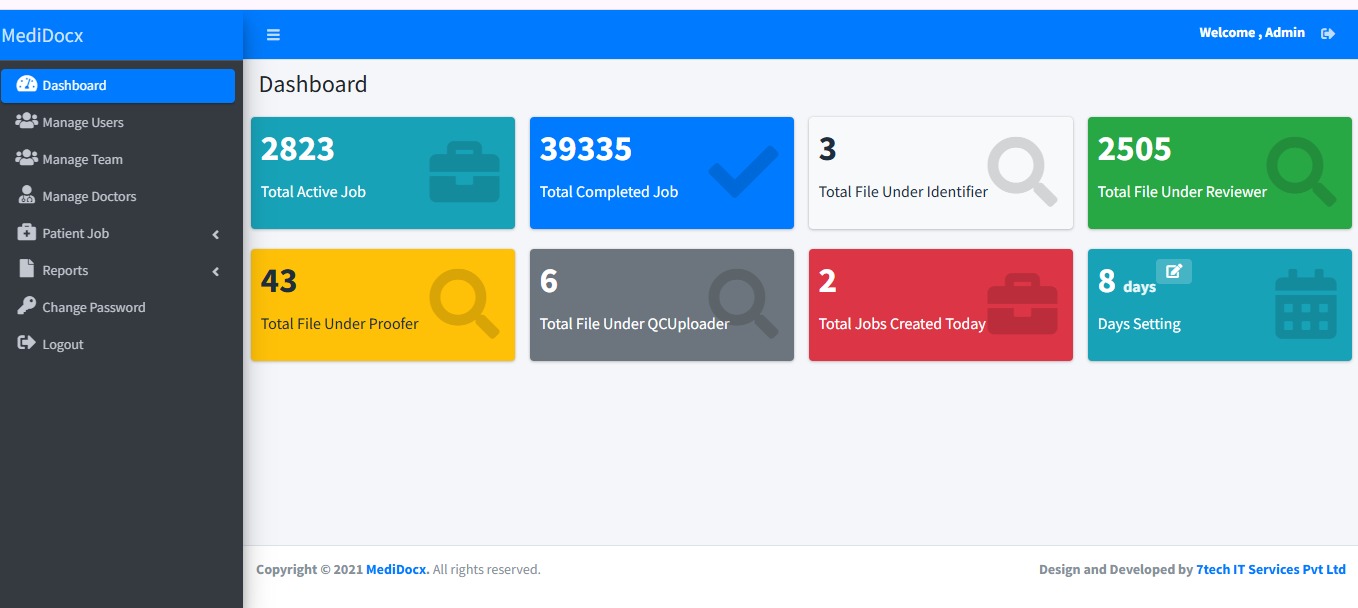
MediDocx is a one-stop vendor for healthcare data management, medical record summarization, chronological arrangement, organization and deposition summaries. 7Tech delivered three solutions: an Angular web app, a .NET WinForms desktop app, and a focused daily file-download automation bot. Each solution uses its own backend.
Record verified
109 pages processed
01 · Client overview
A smarter way to manage complex medical records.
MediDocx serves attorneys, insurers and healthcare organizations that need accurate medical record summaries, chronologies and deposition summaries. Each case involves large files moving through several people and quality checks. The client needed a dependable way to assign, track and deliver every job while maintaining visibility.
One organized workspace
Keep case files, assignments and versions connected.
Structured processing
Move every job through a defined six-stage workflow.
End-to-end visibility
Follow job progress, ownership and history in one place.
02 · The challenge
Complex records. Multiple hand-offs. One clear challenge.
MediDocx needed a dependable way to coordinate document-heavy work, people, permissions and quality checks across every case.
06
MediDocx workflow challenges
Right work, right person
No visibility on status
Dedicated desktop experience
Repeated daily downloads
Independent application services
03 · Our approach
Designed as one connected operation.
We aligned the web app, desktop app and automation around their individual responsibilities and the medical-record workflow.
Map the process
Structure the six-stage journey, define ownership at each stage and make every hand-off visible.
Build independently
Develop the web app, desktop app and automation bot with separate backends.
Schedule downloads
Configure the bot to retrieve files from multiple platforms at a predefined time every day.
Save locally
Store downloaded files automatically in the specific folder configured on the user's computer.
04 · Connected ecosystem
Three solutions.
Three solutions.
Three separate backends.
Each solution performs a distinct role within the MediDocx operation. Explore how the web app, desktop app and automation bot work.
Independent backends · Separate responsibilities
05 · Technology stack
Three technologies.
Three technologies.
Purpose-built solutions.
The MediDocx solutions use Angular for the web application, .NET WinForms for the Windows desktop application, and SQL for structured data storage.
Angular
Used to develop the browser-based MediDocx application, providing an organized interface for administration, job management and workflow tracking.
Web Development.NET WinForms
Used to build the Windows desktop application, providing a dedicated desktop experience for document-focused operations.
Windows DesktopSQL
Used for structured data storage within the MediDocx solutions, supporting organized application data and records.
Database Management
06 · Workflow process
Six stages, from upload to final delivery.
The six-stage medical-record workflow is handled through the application process. The download bot operates separately and only retrieves files on a daily schedule.
01
Process 1
Updater
Uploads the received record file and enters job details such as patient, doctor, due date and total pages.
02
Process 2
Identifier
Identifies and organizes the pages so the record can be summarized in the right order.
03
Process 3
Reviewer
Reviews and summarizes the record. Jobs are assigned based on each user's page range.
04
Process 4
Proofer
Proofs the reviewer's document and uploads the corrected version.
05
Process 5
Proofer
A second proofing pass where a job requires one.
06
Process 6
QC & Uploader
Performs the final quality check, then uploads the finished file and moves the job to Completed.
07 · Product screenshots
A closer look inside MediDocx.
Explore key screens from the administration experience, including job management, team capacity and traceable job history.
01 · Job management
See the work that needs attention.
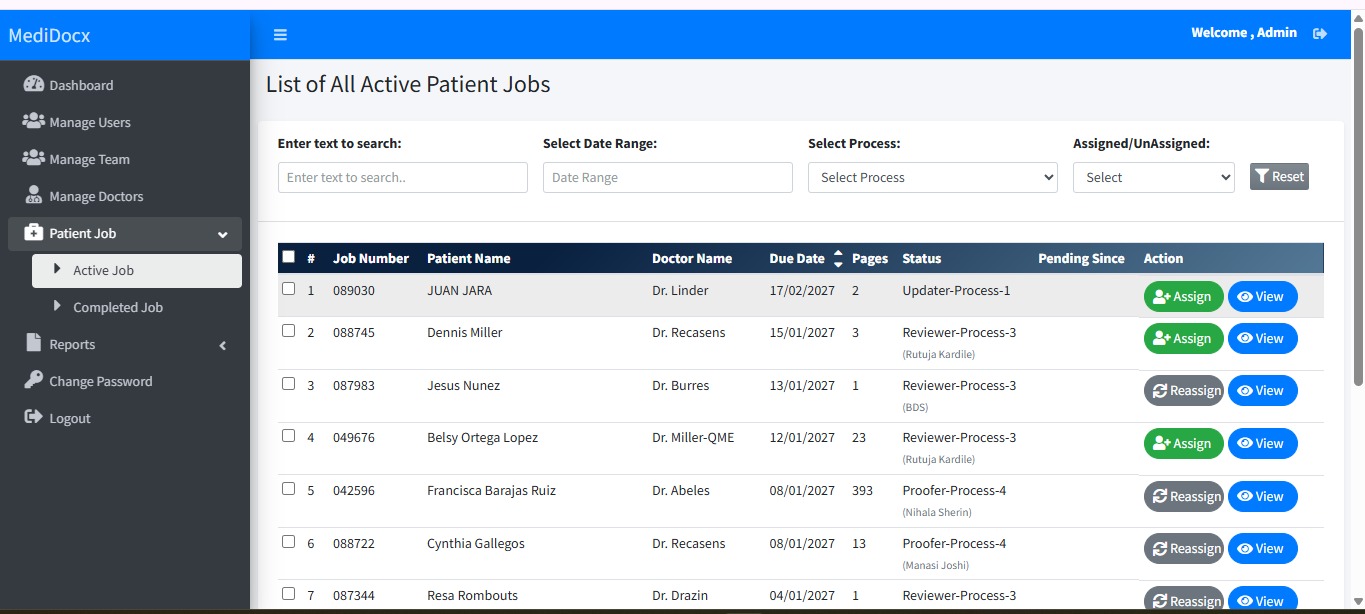
Every job shows its due date, page count, current process and assignee. Filter by text, date range, process or assigned/unassigned state, then assign or reassign work, singly or in bulk.
02 · Team management
Match assignments to team capacity.
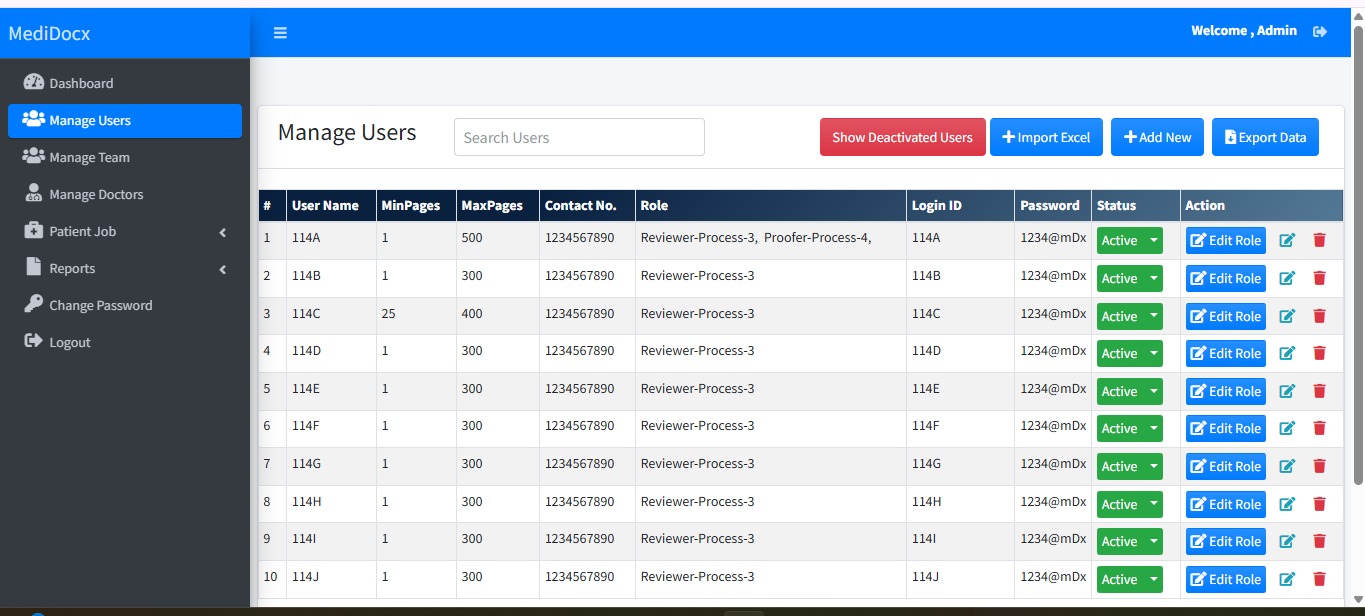
Admins create users, set minimum and maximum page ranges, and assign one or more roles such as Reviewer or Proofer. Users can be imported from Excel, exported, deactivated or edited.
03 · Job history
Every hand-off has a traceable history.
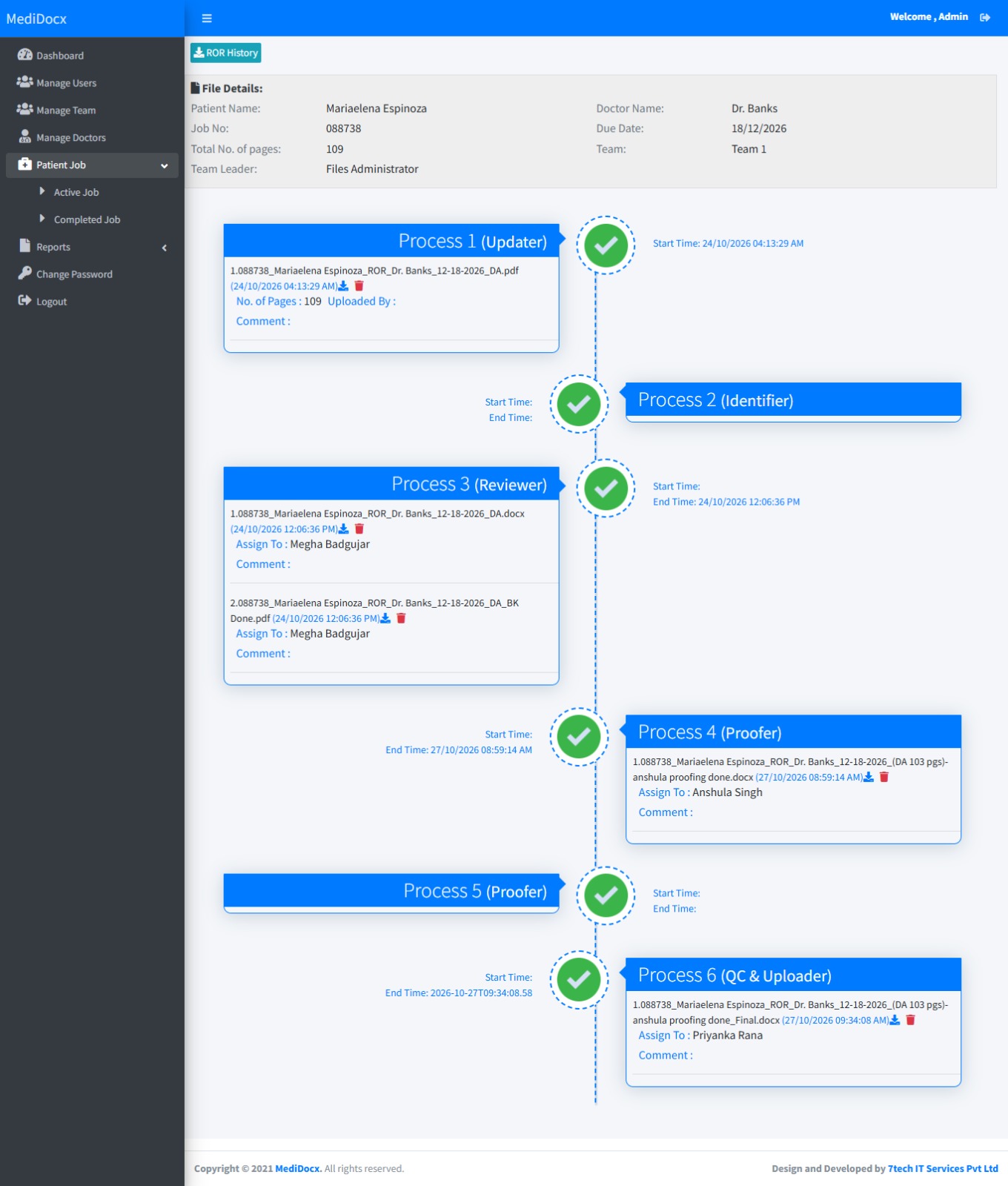
Open any job to see the patient file details and a vertical timeline of all six processes. Each node lists uploaded files, assigned users, and start and end times.
08 · Impact & results
A more structured way of working.
The platform brings job tracking, team assignments, process visibility and scheduled file downloads into a more organized working environment.
03
Solutions delivered
06
Workflow stages
24/7
Accessible web platform
Daily
Scheduled downloads
Platform capabilities and workflow outcomes.